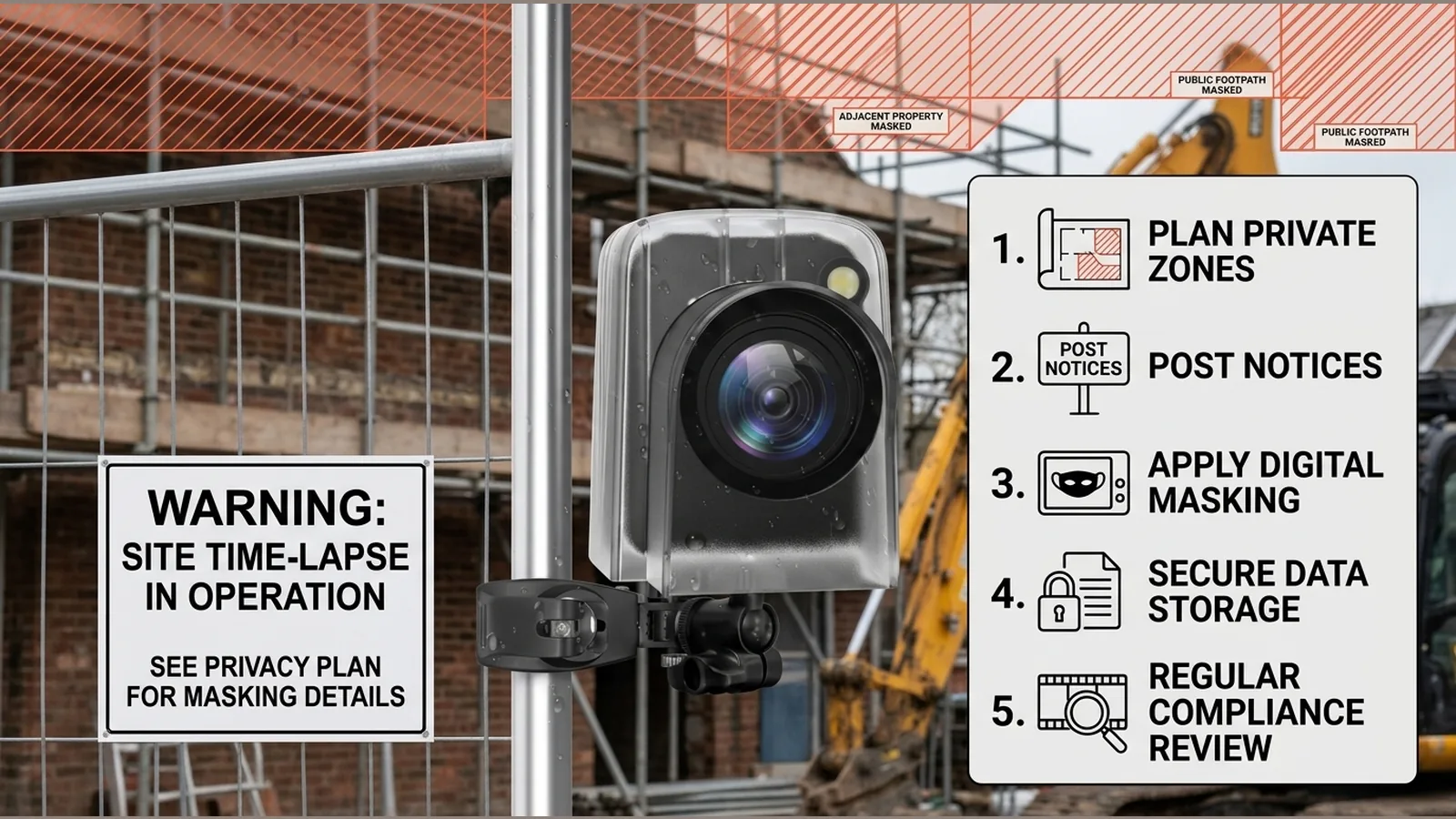
Construction Time-Lapse Privacy Checklist UK: Plan the Frame Before Recording
A construction time lapse privacy checklist UK starts with one point: if workers, visitors or passers-by can be identified in your footage, that recording can be personal data, and your organisation may need to follow UK data-protection rules before you press record.
This article is practical information for project owners, not legal advice. Whether a time-lapse setup is treated like other video surveillance depends on purpose and context; you must assess your own lawful basis and obligations.
Direct answer: identifiable workers or passers-by can turn project footage into personal data
On a building site, a dedicated time-lapse camera often captures more than steel and scaffolding. Faces, clothing, vehicle plates and distinctive behaviour can make people identifiable. When that happens, organisations recording identifiable individuals through surveillance-style systems are expected to comply with UK GDPR and the Data Protection Act 2018; the exact scope depends on purpose and context, as set out in ICO guidance on what video-surveillance rules address.
Treat marketing progress films, programme evidence and site overview reels with the same privacy discipline you would apply to any continuous or periodic site camera until you have confirmed otherwise for your project.
Define the purpose and responsible organisation
Write down why you are recording: progress proof for the client, programme monitoring, stakeholder updates, or marketing. Name the organisation that decides the purpose and means of processing, and who will handle day-to-day access.
- State the business purpose in plain language before procurement.
- Identify who owns the footage and who can share clips externally.
- Keep personal monitoring of staff out of a progress film unless that is a separately justified purpose.
A clear purpose statement stops the camera drifting into wider surveillance without a fresh decision.
Frame only what the project needs
Data minimisation means capturing the build, not the pavement queue. Before go-live, check angles so you avoid neighbouring homes, public seating and unnecessary street detail where possible. The ICO expects organisations to check camera angles, provide signs and protect recorded data before operating CCTV-style systems; see ICO advice on CCTV steps for organisations.
When choosing kit for framing, a dedicated time-lapse camera with a 2.0-inch screen and an approximately 90-degree rotating preview can help you confirm the shot on site without assuming any legal outcome from the hardware alone. Use the preview to crop to the works zone, then lock the position.
Choose a lawful basis and complete a risk assessment where required
Pick a lawful basis that matches your documented purpose, then record why it fits. For higher-risk or intrusive setups, complete an appropriate risk assessment before recording starts, and keep that assessment with the project file.
- Match basis and purpose; do not reuse a generic template without review.
- Note who may appear (workforce, subcontractors, public).
- Record mitigations such as tighter framing, shorter retention or limited sharing.
If purpose or audience changes mid-project, revisit the basis and assessment rather than stretching the original note.
Place clear notices before people enter the field of view
People should know recording is happening before they walk into view. ICO guidance on complying with data-protection principles for surveillance covers visible notices alongside minimisation, purpose-led retention, security and regular checks; read the ICO principles guidance for surveillance systems.
- Site entrance and site-boundary signs stating that time-lapse or video recording is in use.
- A short privacy notice naming the controller and how to ask about the footage.
- Briefings for inducted workers so signs are not the only channel.
Set access, retention, redaction and deletion rules
Decide who can download clips, how long raw files stay available, and when marketing edits must be redacted or blurred if identifiable people are not needed. Protect stored footage with access control, and delete or anonymise on a purpose-led schedule.
- Limit accounts to people who need the material for the stated purpose.
- Set retention by purpose (for example programme evidence versus public reel).
- Agree redaction steps before any external publish.
- Log deletion or anonymisation when the purpose ends.
Review checklist and FAQ
Quick checklist
- Purpose and controller named in writing.
- Frame limited to what the project needs; angles checked.
- Lawful basis and any required risk assessment recorded.
- Notices in place before people enter the view.
- Access, retention, redaction and deletion rules agreed.
- Security and periodic review of the setup scheduled.
FAQ
Does every construction time-lapse count as CCTV? Not automatically. Scope depends on purpose and context; assess your setup against UK GDPR and ICO video-surveillance guidance rather than assuming inclusion or exclusion.
What if the public footpath is unavoidable? Tighten the frame where you can, use notices, minimise retention and avoid publishing identifiable stills unless justified.
Who should approve sharing on social media? The organisation responsible for the purpose should approve sharing against the same retention and redaction rules as internal use.
If you are planning a site progress camera and want product details for a dedicated time-lapse unit you can use as a framing aid on site, see the current product details for this time-lapse camera.